IIT Gandhinagar · Agentic Engineering

The Evolution of the Harness

From Autocomplete Plugins to Autonomous Multi-Agent Fleets

Arnav Gupta · Session 02

The Core Thesis

A raw LLM predicts tokens. A harness turns those predictions into a safe, stateful action loop.

The Model (Passive Predictor)

  • Probabilistic next-token distribution
  • Static weights + bounded context
  • No direct OS or file access
  • Cannot see whether code works

The Harness (Active Runtime)

  • Context: repo rules, git, code
  • Tools: read, edit, test, shell
  • Safety: permissions + sandbox
  • Control: queues + subagents
The LLM does not execute commands. The harness parses model intent, performs system calls, and feeds results back.

Where the Model Sits

flowchart LR subgraph H[" "] direction LR C["①"] --> M["②"] --> G{"③"} --> T["④"] --> R["⑤"] R -.-> C end

① Context → ② Model → ③ Policy → ④ Tools → ⑤ Results

The harness owns every step except the model’s proposal.

The model is one component in the loop—not the component with file, shell, or permission authority.

The Evolutionary Arc

2021

Autocomplete

Ghost Text Inline

  • Cursor context
  • No tools
2023

Sidecar & Edit

In-Editor Chat & Diff

  • Chat + targeted diffs
  • Human runs and checks
2025

Terminal CLI

Stateful Tool Loops

  • Shell, git, tests
  • Repair from feedback
2026

Graphs & Fleets

Distributed Swarms

  • Task graphs + workers
  • Persistent shared state
Notice the trajectory: From UI-constrained inline helpers to autonomous CLI engines to distributed agent networks.
Act 1

The IDE Plugin Era

From Ghost Text to Full Workspace Context

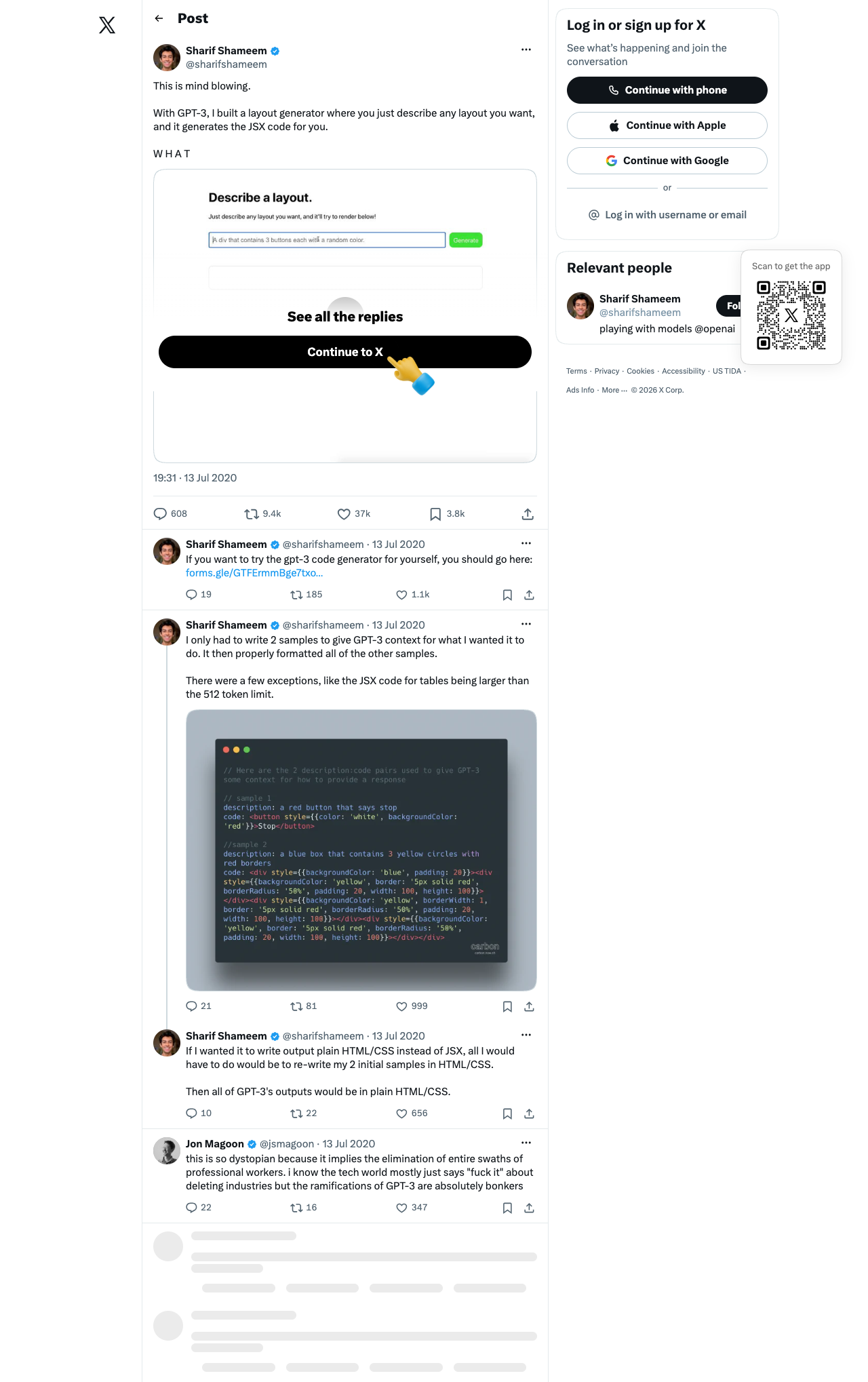
2020: The First Spark — Sharif Shameem's Demo

July 2020: a plain-English prompt produced live React/JSX.

The Prototype Anatomy

  • Prompt: “Add button + textbox + list”
  • Output: JSX in a live preview
  • Missing: files, tests, feedback, project context

The human still copied, ran, and debugged.

Sharif Shameem GPT-3 JSX Tweet (July 2020)
Evidence: Sharif Shameem on Twitter (@sharifshameem, July 13, 2020). Demonstrated zero-shot code generation before Codex existed.

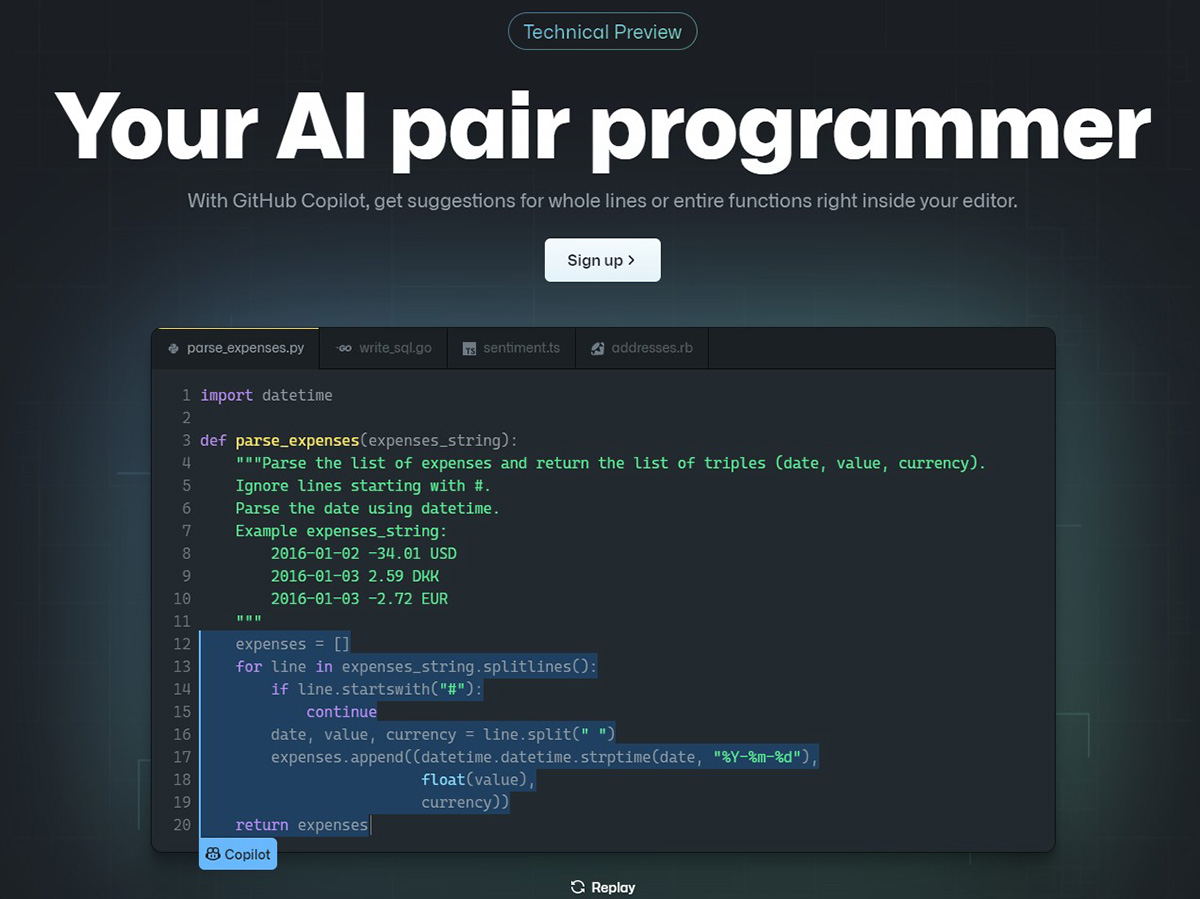
2021: GitHub Copilot & Ghost Text Autocomplete

GitHub Copilot 2021 Ghost Text Autocomplete

The Autocomplete Harness

  • Model: Codex
  • Context: code around the cursor
  • UX: low-latency ghost text
  • Control: Tab accept; type to dismiss

The Structural Limits

Single file. No tools or compiler loop. The developer verifies every suggestion.

Reference: Chen et al., "Evaluating Large Language Models Trained on Code" (Codex Paper, July 2021).

2023: Inline Generation & The Sidecar Chat

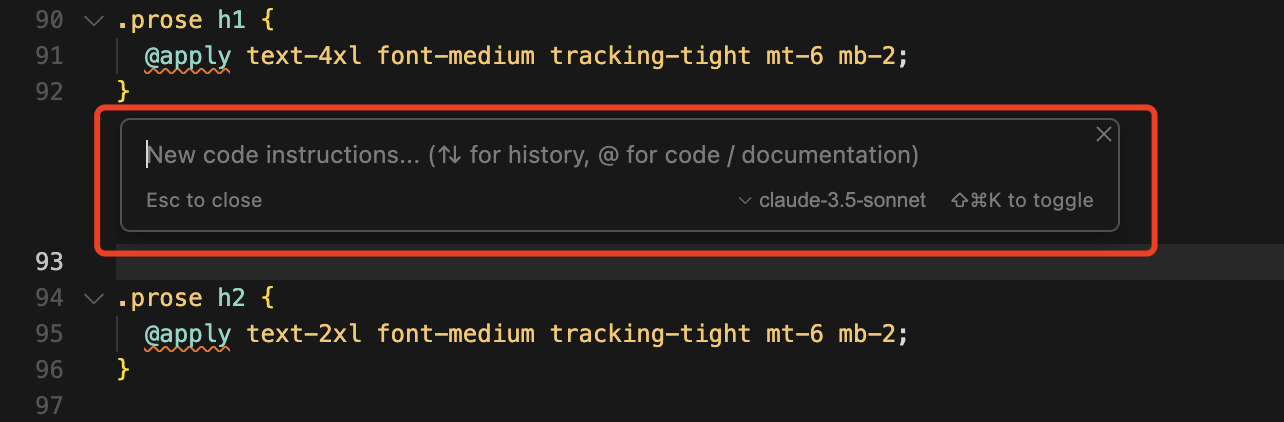
Inline Edits (Cmd+K)

Cursor's inline edit prompt bar directly over source code
  • Select code + describe a change
  • Return a focused diff

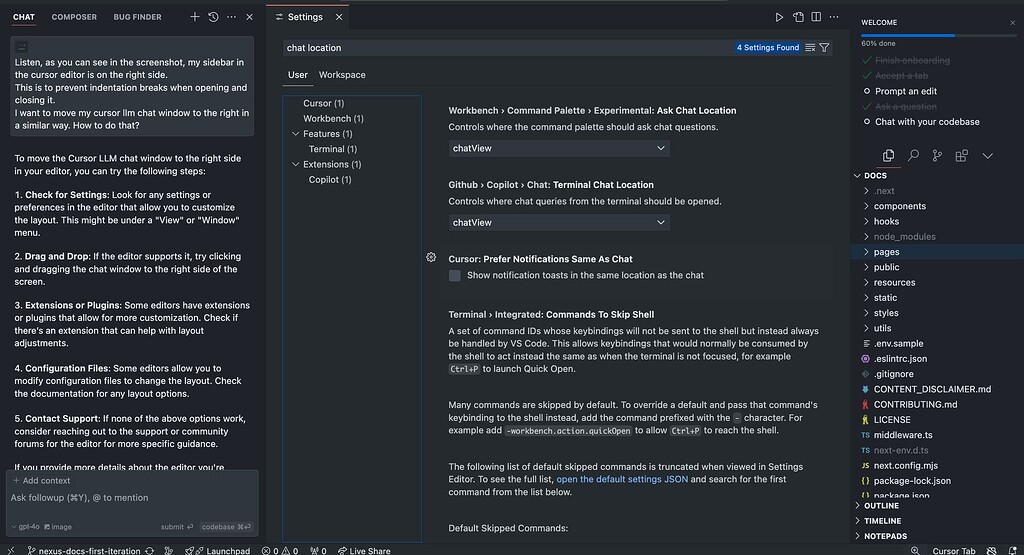
Sidecar Chat (Cmd+L)

Cursor's sidecar chat panel beside the editor
  • Conversation beside the editor
  • Explicit context: @file, @symbol
  • Human bridge: paste code and errors
In 2023, the human developer was still the execution and error-correction loop. Screenshots: Cmd+K · sidecar chat.

Sequence: The 2023 In-Editor Flow

sequenceDiagram autonumber actor Dev as Developer participant IDE as IDE Editor (Cursor or Copilot) participant LLM as LLM API Dev->>IDE: Highlight function + "Add error handling" (Cmd+K) IDE->>LLM: Prefix + Selected Code + Suffix + User Instruction LLM-->>IDE: Stream rewritten code block IDE->>Dev: Show inline unified diff (Accept or Reject)
Notice that the IDE mediated context and diff presentation, but the human was the sole verification engine.

2024: Multi-File Context & Speculative Workspaces

Cursor Composer & Windsurf Cascade

  • Index: code symbols + repository context
  • Shadow workspace: stage edits before disk
  • LSP: check diagnostics before review
flowchart TD U["User Prompt"] --> IDX["AST & Repo Index"] IDX --> CTX["Context Engine"] CTX --> LLM["Model Generation"] LLM --> SW["Shadow Buffers"] SW --> LSP{"LSP Diagnostic"} LSP -->|Clean| DIFF["Multi-File Diff"] LSP -->|Error| CTX
The IDE harness evolved from a single cursor position to indexing thousands of repository symbols.

The Ceiling of the IDE Harness

1. UI Modality Bottleneck

Click-to-accept creates fatigue; long jobs monopolize the editor.

2. Tool Sandbox Constraints

Extensions are awkward homes for daemons, containers, and raw system tools.

3. No Headless or CI Automation

Hard to run in CI, SSH sessions, hooks, or cron jobs.

4. Fragile Multi-Turn History

Chat history mixes instruction, chatter, and noisy execution logs.

This tension directly catalyzed the emergence of terminal CLI coding harnesses.
Act 2

The Return to the Terminal

CLI Agents & The Native Execution Loop

Why the Terminal Won

The Developer's Native Substrate

  • Real tools live here: git, npm, pytest, docker
  • Fast, streamable, information-dense
  • Pipes, background jobs, and headless runs

The Lineage of CLI Agents

  • Aider: repo maps + git-aware edits
  • Claude Code: tools, subagents, compaction
  • Goose / Pi / OpenCode: pluggable harnesses
In the terminal, the LLM is directly adjacent to compilers, test runners, and git history.

Anatomy of the CLI Agent Loop

flowchart LR P["1. Context Assembly
(Prompt + Git)"] --> API["2. LLM API Request
(Streaming Response)"] API -->|Tool Call JSON| G{"3. Policy Gate
Permission Check"} G -->|Approved| E["4. Local Tool Run
(Bash/Edit/Grep)"] G -->|Blocked| D["Policy Error"] --> API E --> R["5. Format toolResult
(stdout/stderr/diff)"] R -->|Next Turn Context| API API -->|Text Only| DONE(["Display Response to User & Idle"])
The agent loop repeats automatically until the model emits a text response without tool calls.

Inside the Wire Protocol: Tool Calls & Results

1. Model Tool Call Emission

{
  "id": "call_987xyz",
  "name": "edit",
  "arguments": "{ path: 'src/auth.ts', … }"
}

2. Harness Execution & Feedback

{
  "tool_call_id": "call_987xyz",
  "status": "success",
  "content": "1 line changed"
}
The harness serializes execution outcomes into standardized messages matching provider API schemas.

The Four Stopping Conditions of the Loop

1. Natural Completion

The model sees enough evidence and replies with text—not another tool call.

2. Explicit Termination (terminate: true)

A tool or hook returns terminate: true.

3. User Steering Interrupt

Enter steers; Ctrl+C stops the loop.

4. Circuit Breakers & Budget Caps

A turn, time, cost, or context budget is reached.

Stopping conditions prevent infinite runaway loops and protect developers from runaway token billing.

Guardrails, Permissions & Sandboxes

Permission Tiers

  • Auto read, search, status
  • Guarded write and edit in workspace
  • High-risk shell commands: confirm or allowlist

Sandbox Containment

  • Workspace jail: paths stay under project root
  • OS sandbox: bwrap / containers
  • Compaction: trim massive tool output
A production harness must protect the developer's system from destructive commands or runaway processes.
Act 3

Context Scaling & Subagents

Concurrency, Isolation, and Task Trees

The Context Window Bottleneck & Compression

Why Single-Context Loops Fail

  • Pollution: logs bury the task
  • Attention: long histories degrade recall
  • Cost: every turn resends context
  • Anchoring: dead ends linger

The 100:1 Context Compression Ratio

// Single Thread (Saturated):
[Prompt] → [Grep 8k tokens] → [Test Log 25k]
  → [Edit 1] → [Stacktrace 15k] → 💥 Bloat

// Subagent Architecture (Isolated):
[Main Thread: Clean Prompt & Final Diff]
  ├─ 🔍 [Researcher Child: 35k tokens]
  │    └─ Returns: "Bug: auth.ts:42"
  ├─ 🛠️ [Worker Child: 20k tokens]
  │    └─ Returns: "Fixed & 14 tests passing"
  └─ [Main Thread Context: < 3k tokens Total]
Subagents are primarily a context hygiene and token preservation mechanism, not just concurrency.

Subagent Orchestration Architecture

sequenceDiagram autonumber participant Parent as Parent Agent participant Harness as Harness Runtime participant Child as Isolated Child Subagent participant Tools as Workspace Tools Parent->>Harness: invoke_subagent(role: Researcher, task: Locate JWT leak) Note over Harness: Allocates fresh session ID and isolated context transcript Harness->>Child: Launch child execution loop loop Subagent Tool Loop Child->>Tools: grep_search, view_file, bash Tools-->>Child: Raw tool outputs (25000 tokens) end Child->>Harness: Return structured summary (Leak found in src/jwt.ts line 58) Note over Harness: Destroys child transcript and keeps only concise summary Harness->>Parent: Deliver tool_result with concise summary (200 tokens) Parent->>Tools: Apply targeted patch to src/jwt.ts
The child runs an internal loop, collapses its execution history into a summary artifact, and returns it to the parent.

Forked vs. Clean Slate Contexts

fork_context = true (Branching)

Child inherits a complete clone of the parent's message history.

  • Use: review or alternative design
  • Gain: inherits prior discussion
  • Cost: inherits bloat and bias

fork_context = false (Clean Slate)

Child starts with a fresh system prompt and only the explicit task payload.

  • Use: research or verification
  • Gain: focused and cheap
  • Cost: needs a complete task brief
In software terms: Forking is like a git branch; clean slate is like an independent microservice call.
Act 4

Agentic Graphs & Swarms

Beyond Linear Loops: OpenClaw, Hermes, and Gas Town

From Loops to Agentic Graphs

Graph Engineering Primitives

  • Nodes: Specialized agents (Architect, Backend, Frontend, Reviewer).
  • Typed Edges: Explicit relationships (DEPENDS_ON, IMPLEMENTS).
  • Cyclic Routing: Automated test/lint failure routing back to worker nodes.
flowchart TD REQ["Request"] --> ARCH["Architect Agent"] ARCH --> W1["Backend Worker"] ARCH --> W2["Frontend Worker"] W1 --> REV["Reviewer & Tests"] W2 --> REV REV -->|Failure| W1 REV -->|Passed| MERGE(["Refinery Queue"])
Graphs replace monolithic prompts with structured state machines and automated quality checkpoints.

Modern Agentic Architectures Compared

System Core pattern State lives in
OpenClaw
Peter Steinberger
Scripted tool DAGs Typed graph pipeline
Nous Hermes
NousResearch
Sessions as infrastructure SQLite lineage tree
Gas Town
Steve Yegge
Git-backed swarm Worktrees + DoltHub
Three patterns: script-driven DAGs, session lineage, and git-worktree fleets.

Gas Town: Persistent Git-Backed Fleets

A persistent swarm manager for large codebases.

The Gas Town Cast

  • Mayor: routes work
  • Polecats: workers in worktrees
  • Witness: watches for stuck work
  • Refinery: tests and merges
  • DoltHub: shared work state
flowchart TD M["Mayor Coordinator"] -->|gt sling| P1["Polecat 1 (Backend Worktree)"] M -->|gt sling| P2["Polecat 2 (Frontend Worktree)"] W["Witness Patrol Daemon"] -.->|Monitors Health| P1 W -.->|Monitors Health| P2 P1 -->|PR Complete| R["Refinery Merge Queue"] P2 -->|PR Complete| R R -->|Merge to Main| MAIN["Main Git Repo"]
Gas Town uses git worktrees as isolated sandboxes so multiple agents work on the same repo simultaneously without conflicts.
Act 5

Case Study: The Pi Architecture

A Transparent, Minimalist Coding Harness

Why Pi? The Anti-Bloat Philosophy

"If I don't need it, it won't be built." — Mario Zechner (badlogic)

What Typical Harnesses Do

  • Huge built-in prompts
  • Large, fixed toolsets
  • Hidden state and agents
  • Frequent confirmation popups

What Pi Does

  • ~750-token prompt on disk
  • 4 tools: read, write, edit, bash
  • Plans are repo markdown files
  • Sandbox + readable JSONL sessions
Pi demonstrates that an elegant, extensible harness does not require thousands of lines of framework bloat.

Pi's Modular Monorepo Architecture

flowchart TD subgraph CLI["CLI Layer: @earendil-works/pi-coding-agent"] TUI["pi-tui (Terminal UI)"] SESS["Session Store (JSONL Tree)"] EXT["Extension Loader (Plugins)"] end subgraph CORE["State Layer: @earendil-works/pi-agent-core"] AGENT["Agent Class (State & Queues)"] LOOP["agentLoop() (Async Generator ~683 LOC)"] HOOKS["Lifecycle Hooks (before / after)"] end subgraph AI["Provider Layer: @earendil-works/pi-ai"] UNIFIED["Multi-Provider API (Claude, GPT, Gemini)"] SCHEMAS["TypeBox Tool Schemas & Cost Tracker"] end CLI --> CORE CORE --> AI
The entire agent runtime fits in 683 lines of TypeScript across clean package boundaries.

Inside Pi's Event Stream & Lifecycle

flowchart LR AS["agent_start"] --> TS["turn_start"] TS --> MS["message_start"] MS --> MU["message_update (delta)"] MU --> ME["message_end"] ME --> TXS["tool_execution_start"] TXS --> TXE["tool_execution_end"] TXE --> TE["turn_end"] TE -->|More Tools / Queue| TS TE -->|Settled & Idle| AE["agent_end"]

Low-Level agentLoop()

Async generator: yields events without waiting. Fast for headless work.

High-Level Agent Class

Awaits listeners in order. A message barrier ensures consistent state before tools run.

The barrier pattern guarantees that hooks like beforeToolCall see agent state that already includes the assistant message.

Steering vs. Follow-up: Interruption Mechanics

agent.steer(message)

  • When: before the next model call
  • Trigger: Enter while working
  • Use: mid-flight correction

agent.followUp(message)

  • When: only when work would end
  • Trigger: Alt+Enter
  • Use: queue the next phase

Queue Drain Modes

Drain "one-at-a-time" for a response each turn, or "all" as one prompt batch.

First-class steering and follow-up queues enable interactive human-in-the-loop control without aborting the session.

The Pi Extension API

Extensions are ordinary TypeScript modules over one typed API:

export default function myExtension(pi: ExtensionAPI) {
  pi.registerTool({ name: "query_db", execute });
  pi.registerCommand("lint", runLint);

  pi.agent.beforeToolCall = async (call) =>
    blocks(call) ? { block: true } : undefined;

  pi.agent.afterToolCall = async (call, result) =>
    augment(call, result);
}
A small, typed API gives developers full power to shape tools, guardrails, and post-processing feedback.
Act 6

Building an Extension

Walkthrough: Real-Time Auto-Linting in Pi

Walkthrough · Step 1: Goal & Hook Selection

The Objective

After every TypeScript edit or write:

  1. Run eslint / tsc.
  2. Append diagnostics to the tool result.
  3. Let the next turn repair them.

Why afterToolCall?

Linting needs the saved file. This hook augments the result before the model sees it.

flowchart TD EDIT["edit(file)"] --> DISK["Harness Writes Disk"] DISK --> HOOK["afterToolCall Hook"] HOOK --> LINT["Execute eslint"] LINT --> FEED["Inject Errors in toolResult"]
Zero manual prompt engineering required; the feedback loop is automated by the harness.

Walkthrough · Step 2: Registering the Hook

Create extensions/auto-linter.ts in your project repository:

export default function autoLinter(pi: ExtensionAPI) {
  pi.agent.afterToolCall = async ({ toolCall, result, isError }) => {
    if (isError || !["edit", "write"].includes(toolCall.name)) return;

    const path = toolCall.args?.path as string;
    if (!path?.match(/\.tsx?$/)) return;

    return runLinterOnPath(path, result);
  };
}
Clean guard clauses ensure we only lint relevant TypeScript files that were successfully mutated.

Walkthrough · Step 3: Executing the Linter

Spawn the local linter process and augment the result text:

export async function runLinterOnPath(path, result) {
  try {
    await execFile("npx", ["eslint", path]);
    return result;
  } catch (error) {
    const output = error.stdout || error.stderr;
    return { ...result,
      content: `${result.content}\n\n⚠️ Lint:\n${output}` };
  }
}
By appending diagnostic output to originalResult.content, the model sees compiler errors as native tool feedback.

Walkthrough · Step 4: The Autonomous Repair Trace

sequenceDiagram autonumber participant LLM as Model participant Pi as Pi Harness participant Ext as Auto-Linter Extension participant ESLint as ESLint CLI LLM->>Pi: edit(src/calc.ts, add(a, b)) Pi->>Pi: Write changes to disk Pi->>Ext: Trigger afterToolCall() Ext->>ESLint: npx eslint src/calc.ts ESLint-->>Ext: Error: add is not defined (no-undef) Ext-->>Pi: Return result + Warning: add is not defined Pi-->>LLM: Deliver toolResult containing lint error Note over LLM: Model notices missing import in tool output LLM->>Pi: edit(src/calc.ts, import add and return) Pi->>Ext: Trigger afterToolCall() Ext->>ESLint: npx eslint src/calc.ts ESLint-->>Ext: Exit 0 (Clean) Ext-->>Pi: Return clean original result Pi-->>LLM: Deliver clean toolResult
The agent self-corrects in a single seamless session without human copy-pasting.

Walkthrough · Step 5: Harness Engineering Takeaways

Why Hook-Driven Feedback Wins

  • Zero prompt bloat: tools enforce quality
  • Deterministic truth: linters beat guesses
  • Self-correction: repair before review

The Golden Rule of Harness Engineering

"Don't prompt what you can verify with a tool, and don't verify by hand what your harness can hook into the loop."

Harness engineering is about creating closed-loop deterministic verification around probabilistic generation.

The Expert Blind Spot in Agentic Coding

The Novice Perspective (Prompt-Centric)

  • Chases the perfect prompt
  • Copies code and errors by hand
  • Treats the model as an oracle

The Agentic Engineer (Harness-Centric)

  • Designs tools and sandboxes
  • Automates verification
  • Protects context with task structure
  • Uses the LLM inside a deterministic loop
Adapted from Brown University's Agentic Studio (Krishnamurthi, Fisler, Littman) & IIT Gandhinagar.

Summary & Key Takeaways

01

The Paradigm Shift

Ghost text → chat → CLI loops → fleets.

02

The Atomic Loop

Context → call → policy → tool → feedback.

03

Context Hygiene

Subagents keep noisy exploration out of the main thread.

04

Deterministic Truth

Hook compilers and linters into every edit.

05

Minimalist Rigor

Prefer transparent, testable, typed kernels.

Next: Lab 02 — Building Custom Lifecycle Hooks for CLI Agents

IIT Gandhinagar · Agentic Engineering Course · Questions & Discussion